Generate Formats
Auto-generate formats for all media in a scene.
This script applies a standard mapping to the working format for all shots in a scene, creating formats as needed.
To use, select Generate Formats under the main Baselight or Daylight menu.
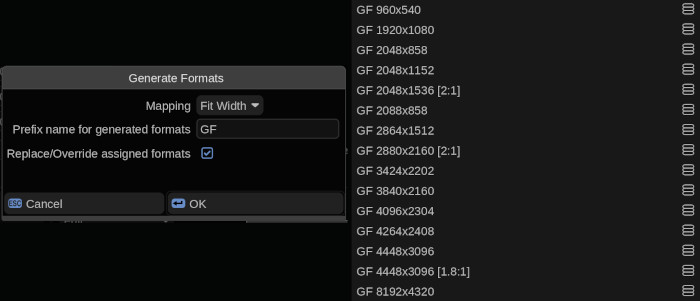
Options
Mapping Options
- Fit Width - Fit the left and right edges of the source media to the left and right of the working format. May result in letter-boxing or the top and bottom being cropped.
- Fit Height - Fit the top and bottom edges of the source media to the top and bottom of the working format. May result in pillar-boxing or the sides being cropped.
- Fit All Inside - Fit the entire source frame within the working format. May result in letter-boxing or pillar-boxing.
- Fill Frame - Fill the entire working format, may result in cropping either the top and bottom OR the sides of the source media.
Prefix name for generated formats
Auto-generated formats will be given this prefix, for example if the prefix is “GF” an auto-generated format for a 4448x3096 source will be named “GF 4448x3096”
Replace/Override assigned formats
- ☐ (unchecked) formats and mappings will only be generated for shots with basic formats (the source resolution surrounded by parenthesis)
- ☒ (checked) format mapping will be updated for ALL shots, even if already assigned a named format
Installation
Place GenerateFormats.py into the /vol/.support/scripts folder which is the same as
- Linux: /usr/fl/scripts
- MacOS: /Library/Application Support/FilmLight/scripts
Restart Baselight or select Views > Scripts >  > Reload Scripts… to load.